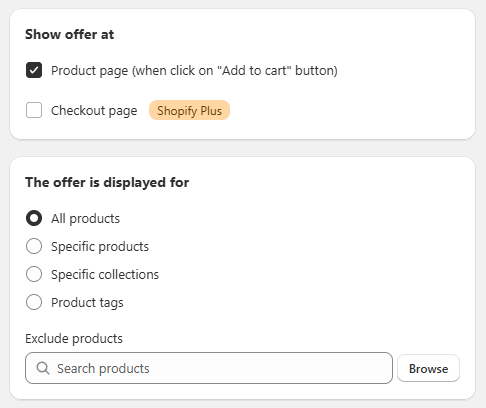
General Settings Sección: Show offer at - The offer is displayed for
Apr 15, 2026
This section allows you to define where the offer will be displayed and which products the quantity-based discounts will apply to.
Show offer at
Defines where the offer will be displayed:
Product page:
Displays the offer on the product page when interacting with the “Add to cart” button.
☐ Checkout page (Shopify Plus):
Allows the offer to be shown during the checkout process.
⚠️ Available only for stores on Shopify Plus.
The offer is displayed for
Configures the scope of the promotion within the catalog:
🔘 All products: Applies the offer to all products.
⚪ Specific products: Allows selecting specific products.
⚪ Specific collections: Applies the offer to selected collections.
⚪ Product tags: Activates the promotion based on product tags.
Exclude products
Allows you to exclude specific products from the promotion:
- Search field to quickly find products.
- Browse button for manual selection.