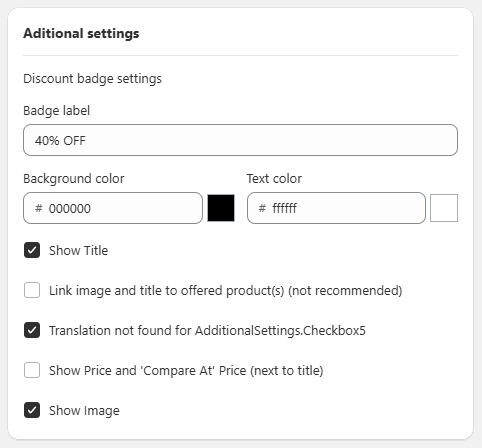
General Settings Sección: Additional Settings
Apr 15, 2026
This section allows you to customize the visual appearance of the bundle and control certain elements displayed to the customer.
Discount badge settings
Allows you to configure the visual label of the discount:
-
Badge label:
Text displayed on the badge (e.g., “40% OFF”). -
Background color:
Background color of the badge. -
Text color:
Text color of the badge.
Display Options
Configure which elements are shown within the bundle:
-
☑️ Show Title:
Displays the offer title. -
☐ Link image and title to offered product(s):
Allows linking the image and title to the products (not recommended). -
☑️ Show Image:
Displays images of the included products. -
☐ Show Price and 'Compare At' Price (next to title):
Displays prices next to the title. -
☑️ Additional options:
Some settings may depend on translations or internal app configurations.
Functional Summary
This section allows you to:
- Customize the discount badge (text and colors).
- Control the visibility of elements such as title, images, and prices.
- Adjust the visual presentation of the bundle in the store.