My Offers
Apr 8, 2026
My Offers (BOGOX – Shopify App)
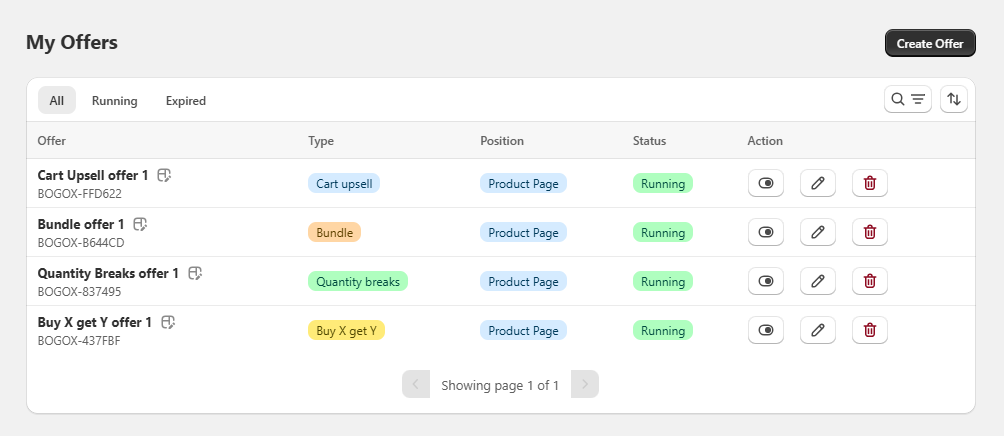
The “My Offers” screen is the main offer management panel within the BOGOX application. From here, the user can view, organize, and manage all promotions created in the store.
General Structure
At the top, there is the title “My Offers”, accompanied by a prominent “Create Offer” button, which allows you to quickly create new promotions.
Below the header, navigation tabs are displayed to help filter offers based on their status:
- All: shows all offers.
- Running: shows only active offers.
- Expired: shows offers that have ended.
On the right side, additional controls are included, such as:
- Search: to locate specific offers.
- Filter/Sort options.
Offers List
Offers are displayed in a structured table with the following columns:
- Offer: Offer name along with its unique identifier (ID).
- Type: Configured promotion type (e.g., Bundle, Quantity breaks, Buy X get Y).
- Position: Location where the offer will be displayed (e.g., Product Page).
- Status: Current status of the offer (e.g., Running).
- Action: Available actions for each offer.
Visible Offer Types
In the image, three types of promotions can be observed:
- Bundle: Grouped product offers.
- Quantity breaks: Discounts based on purchase volume.
- Buy X get Y: Promotions such as “buy X and get Y”.
Each type is identified with a color label to make visual recognition easier.
Available Actions
Each offer includes three main actions:
View (Preview): Allows you to see how the offer will be displayed.
Edit: Opens the offer settings to make changes.
Delete: Permanently removes the offer.
Functional Summary
This section centralizes the entire promotion management, allowing you to:
- Create new offers.
- Filter by status.
- Quickly identify promotion types.
- Edit or delete existing offers.
- Maintain visual control over the status of each campaign.