General Settings Sección: Discount Tiers
Apr 15, 2026
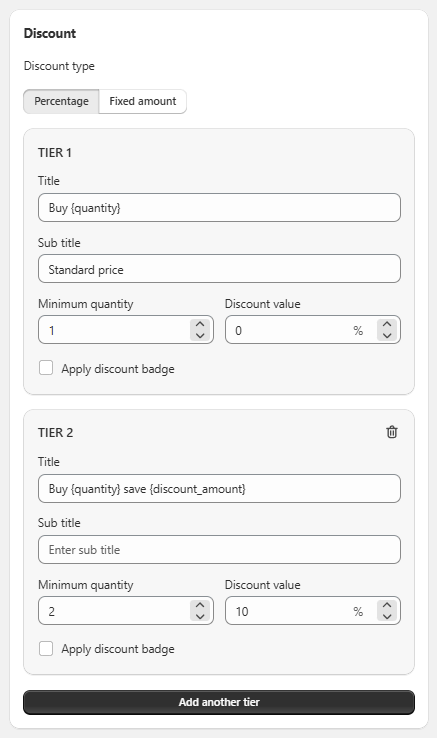
This section allows you to configure quantity-based discount tiers, defining how the benefit changes based on the number of products the customer purchases.
Discount type
Allows you to select the type of discount applied to all tiers:
- Percentage: Percentage-based discount.
- Fixed amount: Fixed-value discount.
Tiers (discount levels)
Each tier represents a purchase condition with its corresponding benefit:
🔹 Elements per tier
-
Title:
Dynamic text that describes the condition (e.g., “Buy {quantity}” or “Buy {quantity} save {discount_amount}”). -
Sub title:
Additional descriptive text (e.g., “Standard price”). -
Minimum quantity:
Minimum number of products required to activate that tier. -
Discount value:
The discount value applied to that tier. -
☐ Apply discount badge:
Allows displaying a visual label indicating the discount.
Tier Management
- Multiple tiers can be added using the “Add another tier” button.
- Each tier can be removed individually (trash icon).
- Tiers allow you to create progressive discount scales (e.g., the more you buy, the higher the discount).
Functional Summary
This section allows you to:
- Define multiple discount tiers based on quantity.
- Configure specific conditions and benefits for each tier.
- Create tiered pricing strategies to encourage larger purchases.